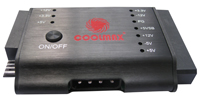
| This product is a simple tester for switching power supply. It makes it easy to test the power supply output. |
| 1. | Turn-on your power supply. |
| 2. | Plug-in your 24 pin power supply connector to mini tester |
| 3. | Check LED light it ON or OFF |
| (+5V. +12V. +3.3V. -5V. -12V. +5VBS. PG) |
| - If the power output is working, the LED will light and you will hear a sound |
| - If the power output fails, you won't see the LED light & no sound |
| 4. | Plug the HDD con, check +12V, +5V |
| 5. | Remove HDD, Plug p4(p6/p8)con, check +12V |
| 6. | Remove p4(p6/p8)con, plug FLOPPY con, check +12V, +5V |
| 7. | Remove Floppy con, plug SATA con, check +12V, +5V, +3.3V |
| 8. | Do not plug wrong position when you use P4 connector |
 |
| Warning: |
| This product is designed only for power supply output tests. Do not leave it connected to the power supply unattended. It generates heat and could possibly damage your power supply. |







 Products